
Summarize the points from this blog post with AI




HubSpot released a long list of product updates at and around UNBOUND 2026 in Boston. In our UNBOUND 2026 recap webinar, the Geear team narrowed that list to four updates we think credit unions and community banks should be paying attention to, plus seven more in a lightning round.
This article covers what each HubSpot update is, where it stands today (beta status and tier), and why it matters for financial institutions.
If you prefer to watch, the full webinar replay is available here.
Chris Leone (CEO) hosted the webinar with Nick Grow (Head of HubSpot Strategy), Laura Turianski (Director of Accounts), Kristin Harrison (Director of Business Development), and Caty Zimmerman (Client Success Manager).
Our top HubSpot updates from UNBOUND 2026 at a glance:
|
Update |
What it does |
Availability (as of October 2026) |
|---|---|---|
|
Personalizes automated nurture emails for each person who receives them |
Public beta. Marketing Hub Pro and Enterprise. 10 HubSpot credits per customized email, per contact |
|
|
Customized CRM views (auto-save and collaborative sharing) |
Auto-saves each user's view changes and adds Owner, Collaborator, and Member sharing roles |
Private beta. All hubs and tiers |
|
Lets users pin, group, rename, and rearrange the HubSpot navigation menu |
Public beta. All hubs and tiers |
|
|
Turns calls, meetings, and emails into next steps, CRM updates, and a shared deal plan |
Public beta. Sales Hub or Service Hub, Pro or Enterprise |
|
|
Uses CRM context to help plan campaigns, build assets, and recommend what to do next |
Public beta |
Credit pricing and beta availability are subject to change. Check your portal for current details.
Update #1: Nurture Agent
Presented by Nick Grow, Head of HubSpot Strategy
What is Nurture Agent in HubSpot?
Nurture Agent is an AI agent in HubSpot that personalizes your automated nurture emails for each person who receives them. It is one of several new agents in HubSpot, and it takes personalization well beyond first-name tokens, segment membership, or lifecycle stage.
Here is what Nurture Agent does:
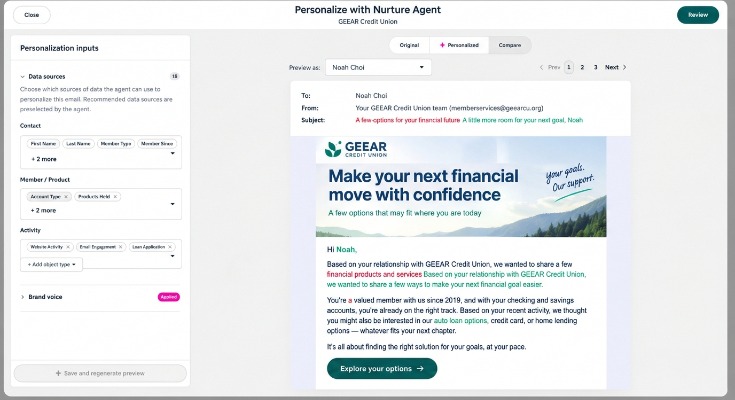
- Rewrites the subject line, preview text, body copy, and button text for every recipient.
- Uses your CRM data, recent engagement, and live web research. That includes signals like email opens and clicks and what the contact has engaged with before. Your email design stays the same.
- Lets you lock any section, such as disclosures or rates, so it is always sent word for word. You don't want the agent sending out random rates to your members.
- Lets you test on a percentage of your audience and compare results against the original before you go all in.
- Lets you preview the personalized email for up to 10 contacts before you launch it in a workflow.
In the editor, you choose which data sources the agent can pull from (contact properties, member and product data, and activity like website visits, email engagement, and loan applications) and apply your brand voice. A redlined preview shows exactly what the agent will change for each contact.
Nurture Agent personalizes copy, not images. It is available with Marketing Hub Pro and Enterprise, and it consumes HubSpot credits like other agents: currently 10 credits per customized email, per contact.
Why Nurture Agent matters for credit unions and banks
Capturing a member's attention in the inbox keeps getting harder. Nurture Agent gives you a way to make members feel known (hopefully not in a creepy way) so they are more likely to engage.
- Members feel known. Each email reflects their products, life stage, and recent activity.
- True 1:1 outreach at scale. You don't need to build dozens of versions for every segment. Manually matching this level of personalization would take a team member countless hours.
- Compliance stays in your control. Required language and disclosures are never rewritten.
- You can prove it before going all in. Built-in reporting shows open, click, and reply rates side by side with the original, so you can see whether the agent is additive or needs tweaking.
- Better results from workflows you already run, including onboarding, loan offers, cross-sell, and member education.
The more data you have in HubSpot, the better Nurture Agent can likely do its job.
Update #2: Customized views and navigation
Presented by Laura Turianski, Director of Accounts
This is two updates rolled into one, because both are about organizing the HubSpot CRM your way.
What changed with customized CRM views in HubSpot?
Customized CRM views now auto-save for each user and support collaborative sharing with three permission levels. This update is in private beta and open to all hubs and tiers. It applies to contacts, companies, deals, tickets, and other objects.
Customized views are common in financial institutions. Member experience teams often need a view of current but inactive members, or members who hold a single product. Branch staff may want a view that members associated with their location.
Anyone who has built a view in HubSpot knows the frustration. You click into a record that caught your eye and realize you forgot to save the view first. With this update, those days are gone.
- Each user works in a personal working layer. Your changes auto-save to your profile only and don't impact anyone else's view until you choose to share them.
- No more concerns about overwriting others' work.
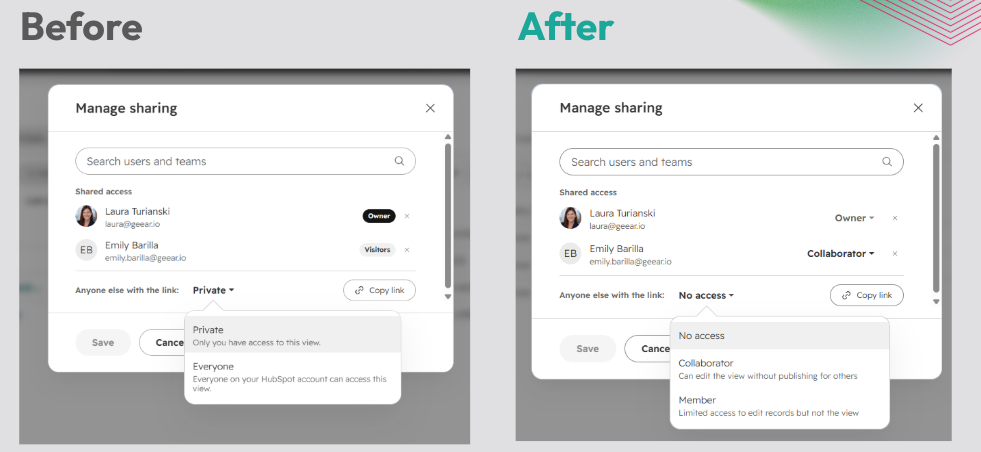
- Sharing controls have been enhanced with three levels:
- Owner: Full control to publish, manage sharing, and assign roles. A single view can have multiple owners.
- Collaborator: Customize filters, sort, edit columns, and change visualization settings without publishing for others.
- Member: A limited role for focused use. Members can edit records but not the view.
Previously, there were only two roles: Owner and Visitor. If a teammate wanted to change a shared view, they had to clone it, make their changes, and save their own version. At scale, that created duplicate views and inconsistency.
What is personalized navigation in HubSpot?
Personalized navigation lets each person tailor the HubSpot menu so they only see what matters to them. It is in public beta and open to all hubs and tiers.
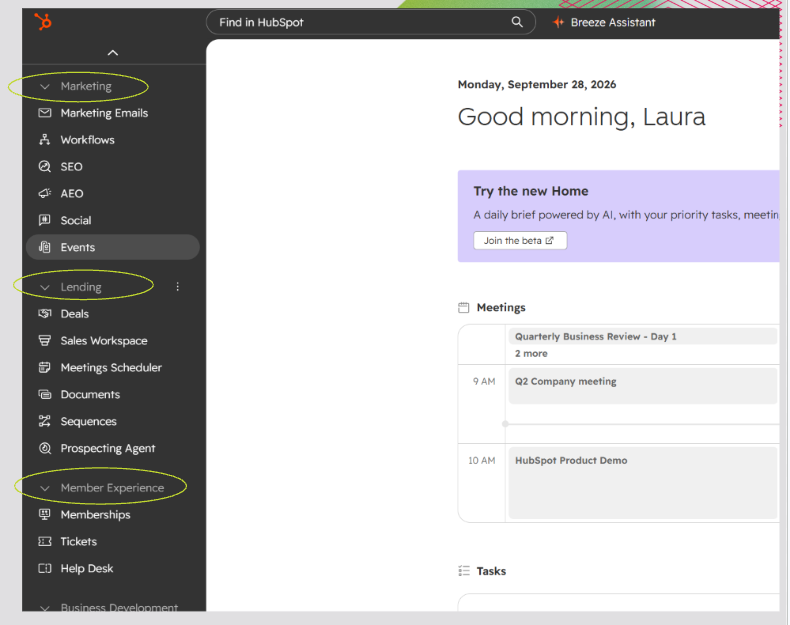
- Portal navigation can be customized by pinning, unpinning, grouping, and renaming items to reflect how each person works.
- Menu items are rearranged with a simple drag-and-drop editor.
- Navigation templates for other teammates are coming soon. For now, navigation is set per person.
In practice, a credit union could set up a Marketing group (marketing emails, workflows, SEO, AEO, social, events), a Lending group (deals, sales workspace, meetings scheduler, documents, sequences, prospecting agent), and a Member Experience group (memberships, tickets, help desk).
Why customized views and navigation matter for credit unions and banks
- Streamlines navigation and gives users flexibility to see what matters most to them.
- Improves visibility and collaboration. Teams see work aligned with their own processes and needs, not forced into HubSpot's defaults. Staff no longer have to remember whether member information lives in the contact record.
- Easier adoption for staff. The CRM feels more like their system, not an imposed one.
Chris called this one of the updates he is most excited about. The hardest part of making HubSpot (or any tool) successful is often getting adoption from other teams. When a tool doesn't look like it was made for them, that is a hard mental hurdle to get over. Customization goes a long way toward the change management every organization faces with a new platform.
Update #3: Deal Progression
Presented by Kristin Harrison, Director of Business Development
What is Deal Progression in HubSpot?
Deal Progression is a set of AI features in HubSpot that turns your calls, meetings, and emails into next steps, CRM updates, and a shared plan with your team. Its purpose is simple: know exactly what moves the deal next. It is in public beta and is geared toward sales, lending, and service teams.
Most of us have walked into a follow-up call scrambling to remember where we left off. Deal Progression works like an organized coworker who remembers what everyone said on the call.
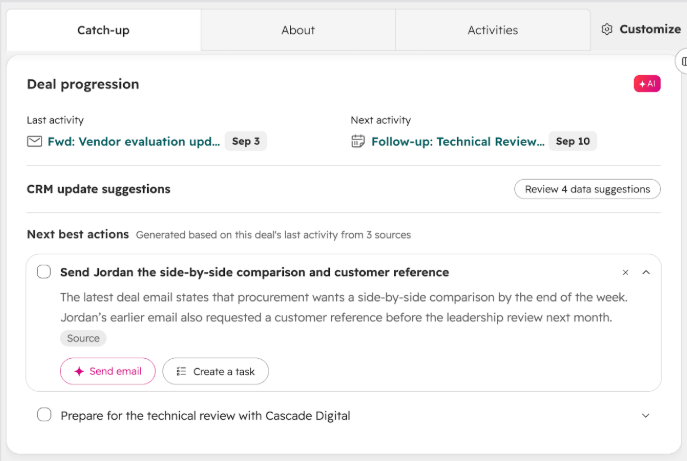
- The Catch-Up tab gives you one view of where every deal stands, right on the deal record. Instead of scrolling through a long timeline of activities, you see where the deal stands, what changed, and what happens next.
- Next Best Actions are prioritized next steps pulled from your calls, meetings, and emails. Each one can become a task with an owner, an email, or a calendar event.
- Suggested CRM updates keep the deal record current. HubSpot suggests the change and the rep approves it, so there are no more automated pings reminding reps to update their deals.
- AI follow-up drafts are replies grounded in the full deal history, ready to review and send.
- Deal Plans are a branded, shareable link where you and your buyer track milestones together. No HubSpot login is needed.
Deal Progression also supports sales methodologies. You can add standard frameworks like MEDDIC or BANT, or your team's own custom methodology.
As conversations happen, HubSpot surfaces the gaps. Did you talk budget? Who is the decision maker? For complex deals, it works like a built-in coach, flagging red flags before they become issues.
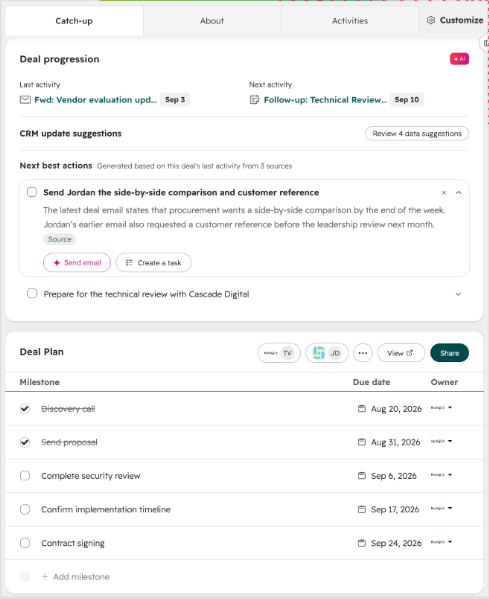
When a deal goes 14 days with no activity, HubSpot prompts the rep to email, call, or book a meeting before the prospect goes cold.
Kristin has tested Deal Progression in Geear's demo portal and in her own portal, and it is doing what it says: surfacing the things that usually slip through the cracks.
Why Deal Progression matters for credit unions and banks
- Commercial deals have a lot of moving parts. Business owner, CFO, attorney, a long document checklist. Deal Plans put it all in one shared place, so nothing sits in someone's inbox.
- Stalled deals get caught early. After 14 days of no activity, HubSpot prompts the rep to take action.
- Humans stay in control. AI suggests and your team approves, which is a good fit for a regulated industry. The personal touch still comes from your people.
- Less time reconstructing context, more time with members. No more digging through notes before the next call.
With more credit unions moving into commercial lending, Chris called this a must-have for lending teams. Laura added that it could be especially helpful for loan officers who split their time, stepping behind the teller line when the branch gets busy and then switching back into a large loan.
Deal Progression requires Sales Hub or Service Hub at the Pro or Enterprise tier. For institutions that only have Marketing Hub today, Kristin sees this as the likely next step, since your data is already in HubSpot.
Update #4: Marketing Studio
Presented by Caty Zimmerman, Client Success Manager
What is HubSpot Marketing Studio?
Marketing Studio is HubSpot's campaign planning tool, and it now uses what HubSpot knows about your institution to help you plan the campaign, build the assets, and learn what to do next. It is in public beta.
Some background: HubSpot Campaigns was rebranded as Marketing Studio at last year's conference. It has always let credit unions tie emails, ads, landing pages, website pages, and QR codes to a campaign, which makes reporting and attribution easier. That matters, because tying marketing back to a contact who went from prospect to new member is one of the hardest parts of the job.
Last year, HubSpot added a visual canvas for campaign planning. What was missing was the CRM context and intelligence to support you proactively. That is the big change this year. Marketing Studio can now use what HubSpot knows about your institution, your audience, your goals, and the assets in your portal.
How Marketing Studio works
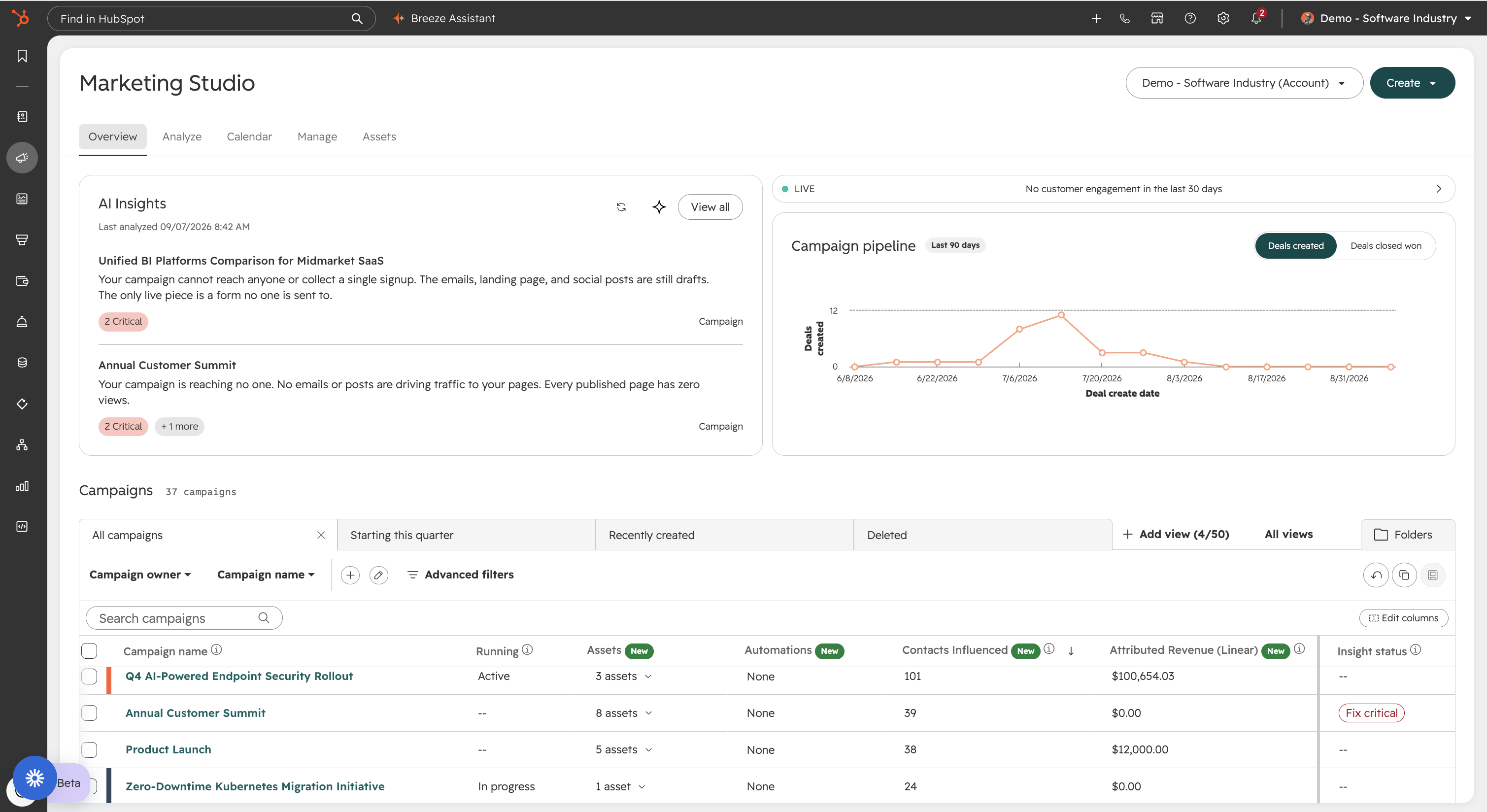
- AI Insights on the Overview tab flag which campaigns need attention, ranked by impact, each with a one-click recommended next step. In one example, a campaign's webinar reminders weren't being sent to anyone. In another, open rates had dropped from 33% to 9%.
- The visual canvas shows your landing pages, forms, events, meetings, and emails in one place, including what is live and what is still in draft.
- A shared campaign brief can be uploaded so everyone works from the same goals.
- Comments and assignments let you tag a teammate on an asset with feedback, a due date, and reminders.
- A live feed shows who is opening and interacting with your emails and ads, with each contact's name and when they last engaged.
- AEO campaign recommendations. Marketing Studio proactively recommends campaigns to improve your AEO visibility, such as a comparison article on topics members are asking AI tools about, and explains how to execute them.
- New ways to start a campaign. Beyond starting from scratch, cloning, or using a template, you can upload documents (for example, AI notes from a team meeting) or start with AI.
When you start with AI, Breeze Assistant walks you through the setup using your CRM context. Tell it what you are promoting, who it is for, and which channels you want. It then builds a campaign brief that includes:
- The campaign goal
- Audience segments that already exist in your portal (for example, a first-time homebuyer list)
- Recommended KPIs, plus what to change if you aren't hitting them two or four weeks in
- An asset plan covering landing pages, forms, emails, blogs, and more
Caty's brief took minutes to create. Manually auditing existing assets and their performance across platforms would have taken far longer.
Breeze will also offer to create the recommended assets for you. Depending on how your institution approaches HubSpot credit usage, we recommend taking Breeze's recommendations and building those assets yourself or with your team until you are comfortable with credit consumption.
Why Marketing Studio matters for credit unions and banks
- Plan with purpose. Tie each campaign to a product, audience, and goal, even when campaigns need to stand up quickly.
- Launch faster. Reuse proven campaign work and reduce time spent coordinating across tools. Marketing Studio flags related assets that performed well.
- Analyze deeper. Examine which touchpoints influence engagement and applications across channels.
- Allocate staff time more wisely. Let AI help with first drafts while your staff review offers, accuracy, and disclosures.
- Act on what you learn. Adjust the offer, audience, or follow-up during the campaign and for the next one.
- Invest with more confidence. Use campaign results and AI insights to decide which audiences, messages, and channels deserve attention.
7 more HubSpot updates worth knowing
Picking the best new features this early is like picking a Hall of Famer on draft day. Some of these will play out bigger than they look today.
1. Title card
The title card on an individual record view can now be customized for both standard and custom objects. You are no longer limited to HubSpot's default properties in that prime real estate. For example, if a checking account is represented as a deal record, you can swap the default deal amount, close date, pipeline, and deal stage for current balance, account open date, status, and branch.
2. Legacy workflow migration
When HubSpot identifies an existing workflow that the new agent builder supports, it flags it with an option to convert to the new builder. Click the button and the workflow opens in the new builder, so you don't have to rebuild it from the ground up. You can also find the option in the workflow's File menu. Nothing is forced. Essentialism is one of Geear's core values, and any chance to avoid redoing work is worth taking.
3. Agent Builder (custom agents)
Agent Builder lets HubSpot users create their own custom agents in the portal. A theme at UNBOUND was that you are no longer just a user of AI tools in HubSpot, you can be a creator of them. You could build an agent that finds specific information in HubSpot or takes action based on conditions you set. This is a "world is your oyster" update, and we look forward to brainstorming use cases with our clients.
4. ChatGPT ads in HubSpot
Released shortly before UNBOUND, this integration lets you create ChatGPT ad campaigns in HubSpot's ad tools using intent-based targeting. You can capture leads, trigger follow-up workflows, and view ChatGPT ad performance and attribution alongside other channels. It is still early days and quite limited today. We included it for where it is headed. Ad dollars follow eyeballs, and as usage shifts to LLMs, ad matching against long, detailed prompts could become very powerful.
5. HubSpot Work Management
HubSpot Work Management (in beta) is AI work management natively connected to HubSpot, where teams and agents organize, accomplish, and automate work. Describe what you need in plain language, and the AI builds projects, tables, documents, forms, and agent automations from a single prompt. It is designed to replace the spreadsheets and outside project tools where work around the CRM has always lived. Where Marketing Studio focuses on campaigns, Work Management can coordinate bigger efforts, like every task involved in opening a new branch.
6. Email quality checks
Email quality checks (in public beta for marketing emails) scan your email before you send it. They catch spelling and grammar issues, spam triggers, broken links, missing personalization token fallbacks, date formatting, and even brand voice mismatches. It is both a quality assurance feature and a consistency feature for organizations with many people sending email.
7. Context Home
Context Home is the centralized place where you give HubSpot's AI tools the information they need about your institution. It launched in May 2026, and HubSpot has continued to improve it. An August update added freeform instructions and file uploads. Before Context Home, context for different AI agents was scattered across the portal. Now it lives in one place, and HubSpot's AI tools reference it every time. Think brand guidelines, organizational goals, and quarterly goals. On the UNBOUND main stage, Yamini Rangan made the point that AI tools with bad context are worse than no AI at all. Context Home is where you fix that.
Which HubSpot update will have the biggest impact on financial institutions?
Most of the panel bet on the updates that make HubSpot easier for every team to use. We asked each panelist which update would move the needle most for a credit union or bank over the next 12 months.
|
Panelist |
Bet for the next 12 months |
Why |
|---|---|---|
|
Caty Zimmerman, Client Success Manager |
Marketing Studio |
Smarter campaign planning, faster launches, and in-flight optimization |
|
Laura Turianski, Director of Accounts |
Personalized navigation and Deal Progression |
Navigation helps every team. Deal Progression helps loan officers who split time between the teller line and large loans |
|
Nick Grow, Head of HubSpot Strategy |
The UI updates (personalized navigation, title cards, auto-saving views) |
Day-to-day ease is the foundation for using bigger tools like Nurture Agent |
|
Kristin Harrison, Director of Business Development |
The UI updates and the sales tools |
Better experience for HubSpot users themselves, and a more RevOps-style use of HubSpot across marketing, sales, and service |
|
Chris Leone, CEO |
Anything that drives adoption |
The technical work is hard, but getting adoption and usage is harder. That is where most tool rollouts fail |
Kristin made a point worth repeating. Some data integrations force staff to look up contacts by member number rather than name. Credit unions talk all day about member experience, and these updates finally improve the experience for the people using HubSpot.
Frequently asked questions
What can HubSpot's Nurture Agent customize in an email?
Nurture Agent can customize the subject line, preview text, body copy, and button text. You decide which sections it can change and which it must leave alone, such as rates or disclosures. It personalizes copy, not images, using the data sources you select.
How much does Nurture Agent cost to use?
Nurture Agent is available with Marketing Hub Pro and Enterprise. It currently uses 10 HubSpot credits per customized email, per contact. Credit pricing is subject to change.
Is HubSpot's personalized navigation set per person or per team?
Personalized navigation is set per person for now. HubSpot is working on navigation templates that can be applied across teams.
Can the same HubSpot tool appear under multiple navigation groups?
No. Within one person's navigation, a tool can't live under multiple dropdowns. You can move it from one group to another or pull it out to stand on its own. Different users can organize the same tool differently in their own navigation.
Do you need Sales Hub to use Deal Progression?
Yes. Deal Progression requires Sales Hub or Service Hub at the Pro or Enterprise tier.
Useful Links to the HubSpot updates mentioned above:
What's next
Many of these updates are in beta, and we are actively testing them in our own portals. If you want help deciding which updates fit your credit union or bank, or how to roll them out with your teams, talk to the Geear team.
About Geear
Geear is a performance marketing agency helping community-based financial institutions punch above their weight. We have partnered with more than 120 credit unions and banks. Geear is a HubSpot Diamond Solutions Partner, a 2025 HubSpot Impact Award winner for Technical Expertise, and a HubSpot Banking and Financial Services Industry Specialist. Our team is 50 people strong and SOC 2 Type II compliant.

Ready for marketing that actually delivers?
Let's build something measurable together.
 Talk to the Team