The Challenge
Our client, a food processing equipment manufacturer, had sold thousands of machines over the years. Their Salesforce database contained valuable customer and equipment data, but it wasn’t being used to generate new sales or service opportunities. Without a system for leveraging this information, potential revenue from parts, upgrades, and maintenance was going untapped.



-1-1.png "Untitled design (5)-1-1")
Since a significant portion of the equipment was purchased more than 20 years ago, the first priority was verifying which machines were still in use. We launched a three-part HubSpot email campaign that linked customers to a landing page with their equipment list and a short form asking them to confirm whether the equipment was still in use. We gave them three response options: All equipment is still in use/ Some equipment is no longer in use / All equipment is no longer in use.
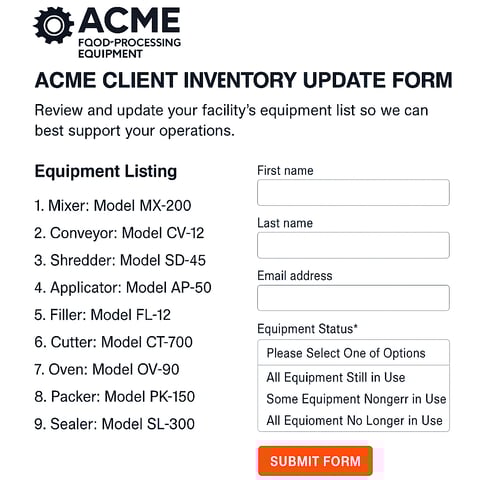
The responses were used to update the asset/equipment inventory in Salesforce (which would flow back into HubSpot via the integration).
- Initial Email: Request customers to review their equipment list and provide a status update.
- Reminder Email: Highlights parts and technical service offering, and reminds them to provide the equipment status update.
- Final Email: Offers help with upgrades, replacements, and parts, while again reminding them to provide an equipment status update.
Phase Two: Targeted Campaigns
With verified data now in HubSpot, we began planning targeted campaigns based on equipment category, machine type, and equipment age.
The campaigns will promote Upgrades or add-ons to existing equipment, Replacement equipment, spare parts, maintenance information, repair and service offerings, and finally, customer satisfaction surveys.
Early Results:
- Several customers contacted their Sales Reps directly, bypassing the form.
- The emails increased awareness among the sales team, who were copied on each message, of which customers owned what equipment.
- The campaigns re-engaged dormant customers, setting the stage for personalized future outreach.
17.2% CTR
From the first verification email. Increased Customer Engagement and re-engaged dormant accounts.
3.7% Form Conversion Rate
Verified active equipment inventory for future campaigns. Sales reps gained visibility into customer ownership data.

Key Takeaways
Keep Equipment Data Current
Maintain an accurate record of customer equipment to reveal new opportunities for sales, service, and parts.
Leverage HubSpot for Education and Engagement
Use HubSpot to remind customers what they own and share helpful maintenance or upgrade information to extend equipment life.
Be Consistent with Nurturing Campaigns
Regular, value-driven communication builds trust over time. Even if conversions take months to develop.
Align Sales and Marketing Teams
Ensure sales reps know what marketing messages are being sent and keep them accountable for updating customer equipment data.
Schedule Regular Data Reviews
Revisit your customer equipment database annually or biannually to confirm active machines and keep marketing lists relevant.
)%20(1).png)
Why Geear & HubSpot
By combining HubSpot’s automation and CRM integration with Geear’s data-driven approach, the manufacturer turned years of unused customer data into a powerful sales and marketing engine. Geear continues to support their long-term strategy with targeted nurture campaigns and ongoing data optimization.
Ready to turn your customer data into sales growth?



Ready for marketing that actually delivers?
Let's build something measurable together.
 Talk to the Team